The screen a driver agrees on
Consent to be texted is given inside the Vasthaul driver app, on the driver’s own phone, signed in as themselves. It sits behind that sign-in, so this page is the public copy of it: two captures of the same panel, taken from the app that ships, at 390 pixels wide — the width of a phone.
It is on the Account screen of the driver app, under the heading Text messages.
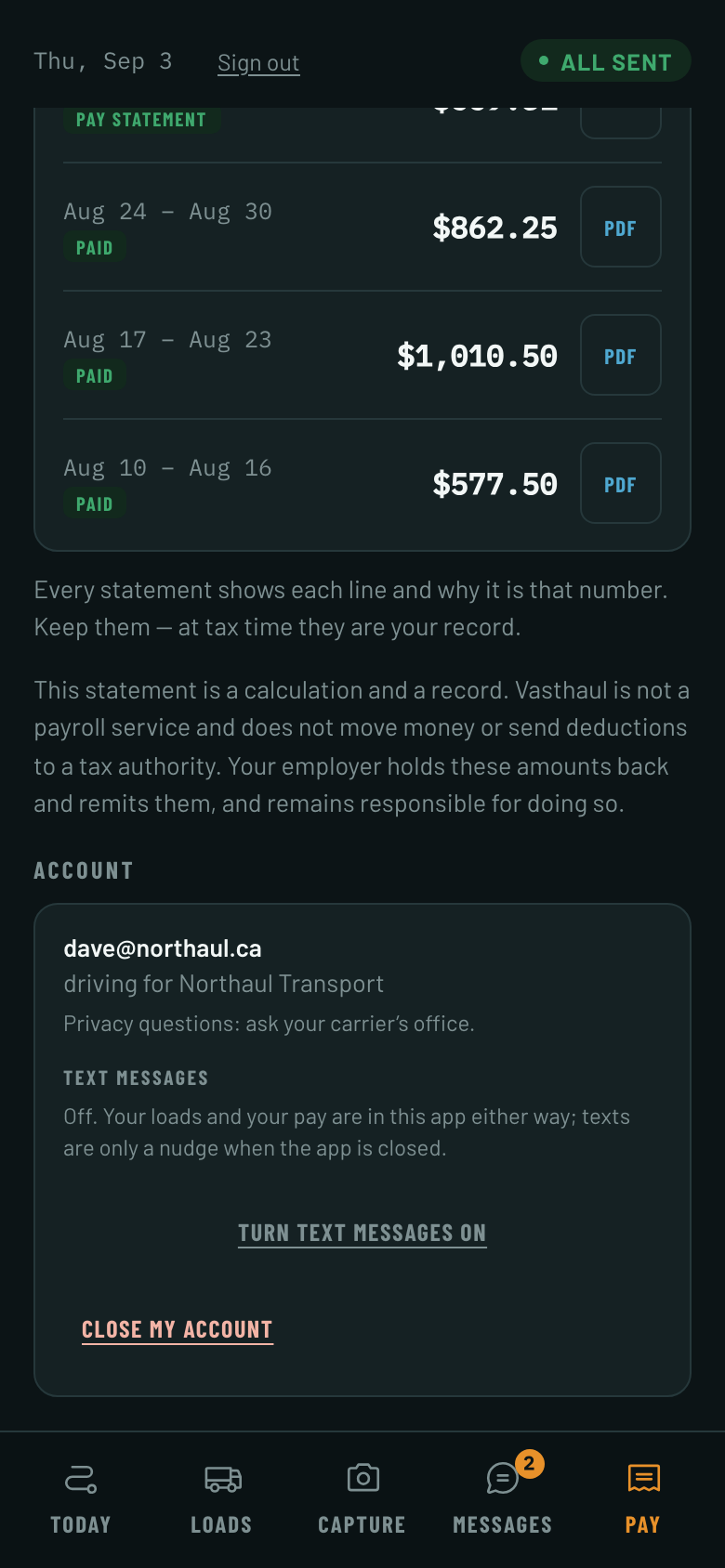
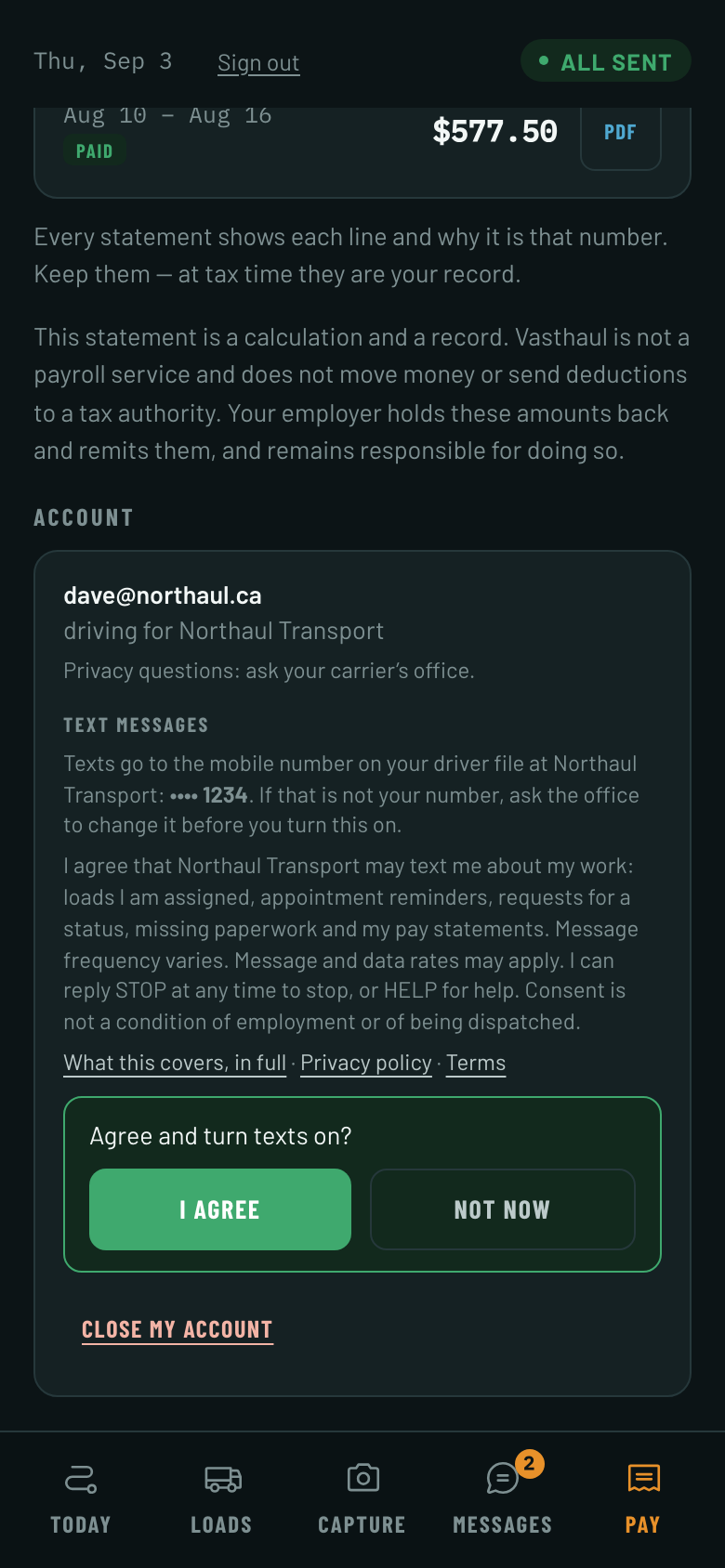
Both captures are of a preview build, which runs the shipping screens against fixture data so that no real driver’s file is on a public page. The carrier name, the email address and the last four digits are invented for that reason. The wording, the controls, the links, and the order of the two steps are the shipping app’s, unchanged.
The exact wording, word for word
This is the sentence on Screen 2, and it is the sentence stored beside the driver’s yes. The carrier’s own name is filled in where the brackets are, because a driver has a relationship with the carrier that pays them and not with a piece of software:
- I agree that [the carrier’s name] may text me about my work: loads I am assigned, appointment reminders, requests for a status, missing paperwork and my pay statements. Message frequency varies. Message and data rates may apply. I can reply STOP at any time to stop, or HELP for help. Consent is not a condition of employment or of being dispatched.
That wording carries a version — this is 2026-09 — and the version is stored with the consent. If the words change in substance the version is bumped and every driver is asked again.
There is one copy of that sentence in the product. The driver app renders it, the consent record stores it, and the Vasthaul text message policy quotes it, all from the same file — so none of the three can come to describe a product the other two have moved on from.
What a driver does, step by step
- Signs in to the driver app as themselves, on their own phone.
- Opens Account, and finds the Text messages panel on it.
- Finds Text messages reading Off, and presses Turn text messages on. That is Screen 1.
- Reads the number the texts would go to, the wording in full, and — if they want them — the text message policy, the privacy policy and the terms, each one link away. That is Screen 2.
- Presses I agree. Nothing has been agreed to before that press; Not now closes the wording and leaves the control off.
- The panel then reads on, for the number ending in those four digits, and carries one link that turns it back off.
A driver whose file has no mobile number on it never reaches Screen 2. The panel tells them there is no number on file and to ask the office to add one, and there is nothing on the screen to press.
Where each thing you are checking appears
In roughly the order a verification form asks for them.
- Mobile number
- Screen
- Screen 2
- Where it is
- The first line: the number the texts would go to, as its last four digits, named as the number on the driver’s file at their carrier. It is not typed on this screen — the carrier keeps it on the driver file and the app shows it back — and a driver with no number on file never reaches this screen.
- A consent control that is not pre-selected
- Screen
- Screen 1
- Where it is
- Text messages reads Off. Off is the state every driver starts in, and nothing but that driver’s own two presses changes it.
- A second, deliberate act
- Screen
- Both
- Where it is
- The first press only opens the wording. I agree is a separate press, beside Not now.
- What the messages will be about
- Screen
- Screen 2
- Where it is
- Named in the wording: loads I am assigned, appointment reminders, requests for a status, missing paperwork and my pay statements. Those are the five the product sends, and there is no sixth.
- Message frequency
- Screen
- Screen 2
- Where it is
- “Message frequency varies.”, in the wording. It follows the work: a driver running two loads a week gets a handful of messages that week, and a driver sitting in the yard gets none.
- Message and data rates
- Screen
- Screen 2
- Where it is
- “Message and data rates may apply.”, in the wording.
- HELP and STOP
- Screen
- Screen 2
- Where it is
- “I can reply STOP at any time to stop, or HELP for help.”, in the wording. The same panel turns them off again, and the first message to any number carries the same instruction on the end of it.
- Links to the terms and the privacy policy
- Screen
- Screen 2
- Where it is
- Three links under the wording and above the buttons: the text message policy, the privacy policy and the terms. All three are pages of this site.
- Consent is not a condition of anything
- Screen
- Screen 2
- Where it is
- “Consent is not a condition of employment or of being dispatched.”, the last sentence of the wording.
- No marketing
- Screen
- Screen 2
- Where it is
- The wording names five operational messages and nothing else. There is no promotion, no offer and no newsletter on this number, to anybody.
What is written down when they press it
The press is a row, not a setting. It records the carrier, the driver, the mobile number, the exact sentence that was on the screen with the carrier’s name already in it, the version of that wording, and the moment. That row is what any later question about consent is answered from.
- A consent can only be written by the product’s own functions. Nothing inserts one directly, and the one a driver presses resolves the driver from their own signed-in session rather than from anything the caller sends.
- A carrier’s office may record a consent a driver gave in writing at hire. That row says it was recorded by the office and names the office user who wrote it down, so the two are never confused — and it can never override a STOP.
- A STOP outranks every consent on file for that number, including one recorded after it. Only the person holding the phone undoes it: by replying START, or by turning the same control back on in the app.
The text message policy has the rest: who is texted and from what number, the five messages in full with an example load, how STOP and HELP work, and what happens to a mobile number. Read the text message policy.
The pages this refers to
Who is texted, what the five messages say, how a driver agrees, how STOP works, how often the messages come and what they cost. Text messages.
What is collected from a driver and from an office user, why, where it is kept, and how to ask for it. Privacy policy.
The agreement between this product and the carrier that opens an account. Terms.