Vasthaul
Trucking TMS · United States and Canada

Run the fleet.Pay the drivers.Bill the customer.

Vasthaul is one load record from the rate confirmation to the driver's phone, the invoice and Friday's settlement — a transportation management system for trucking carriers running twenty trucks or five hundred, on either side of the border.

14-day free trial, no card to start

  • CA + US
  • Flat per fleet
  • IFTA · built in
  • Database held in Canada
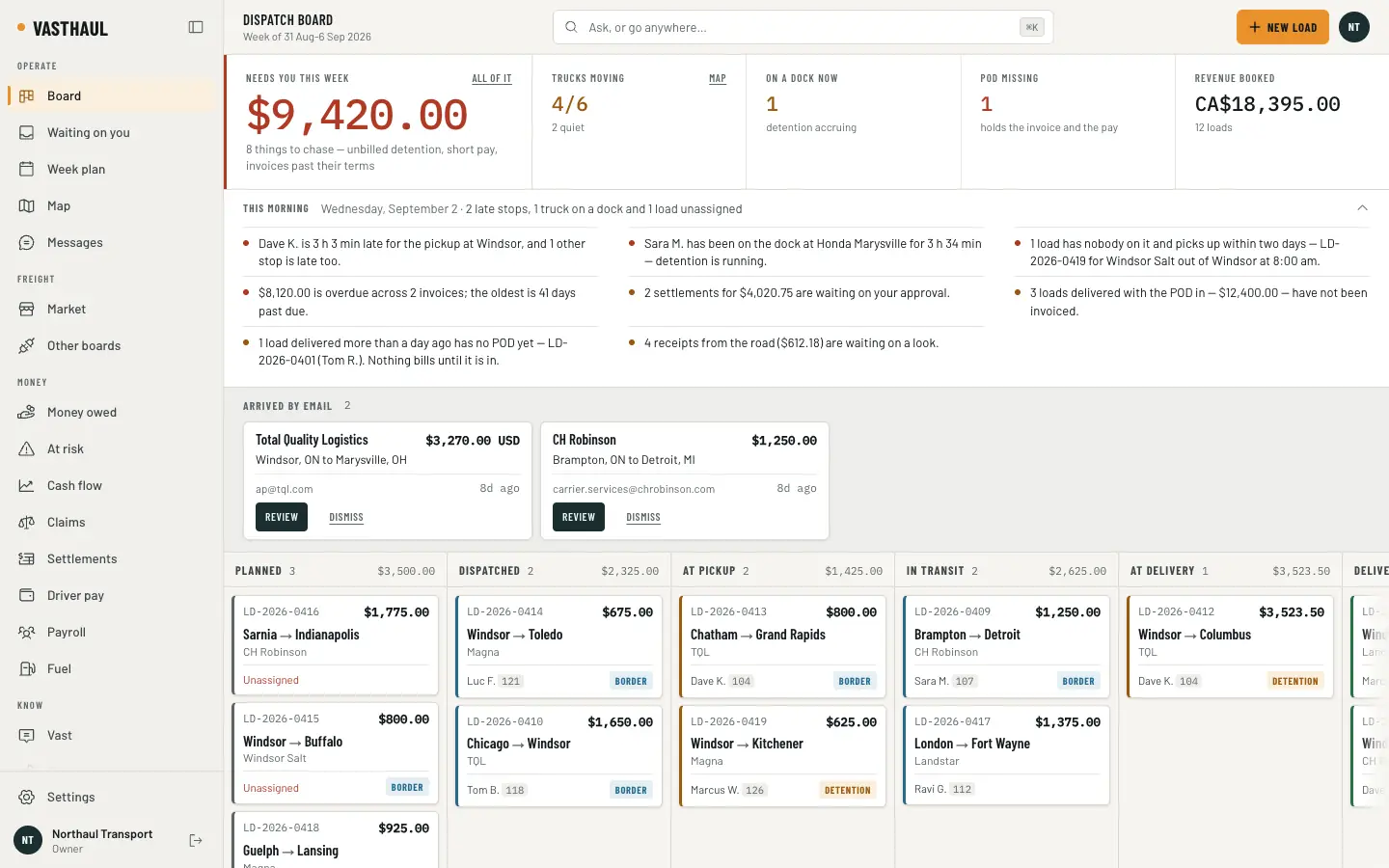
The Vasthaul dispatch board: what needs chasing this week in dollars, how many trucks are moving, the morning’s late stops and unbilled loads, two rate confirmations that arrived by email, and every load on the fleet in columns from planned to delivered.
Rate con read: TQL · Windsor → Columbus · CA$3,523.50
One load recordLD-2026-0412
Rate con read
TQL · Windsor → Columbus · CA$3,523.50
Getting the load in

Send us the load however you get it.

A rate confirmation reaches Vasthaul the way it reaches you. Whichever door it comes through, what lands on the board is the same thing: a draft load with every box filled from the document and the words it was read from printed under each one, waiting for a dispatcher to check it and book it. Nothing books itself.

  1. 01
    Email

    Forward the rate con to your Vasthaul intake address. It is read, drafted and on the board as a card that says who sent it.

  2. 02
    PDF or photo

    Attach it on New load. The reader fills the draft — customer, stops, rate, references — and prints the text each box was read from, so what it could not read is blank rather than guessed.

  3. 03
    Typed

    The form is still there for a load that came in over the phone. Money goes through the same checks, and the distance is measured on a truck-legal route.

  4. 04
    Load board

    A load posted on the Vasthaul market becomes a load on your board the moment the poster accepts your offer, with the customer record and the tracking link already made.

  5. 05
    Customer portal

    A customer with a portal login requests a load; you accept it and it is on the board with their reference on it.

  6. 06
    API

    A partner system pushes loads to your inbound API with a token you minted, scoped to what it may do and counted before it does anything.

  7. Dispatch-ready
The New load screen: a draft read from a TQL rate confirmation, each field showing the words it was read from, a warning that one delivery time could not be read as a date, and a Dispatch panel ranking three drivers with the reasons for each.
Check the draft, then book it: under every prefilled box is the text it was read from, and the panel on the right ranks who can take it and says why.
The board, and the question box above it

One board. Every load, by where it is.

Planned, dispatched, at pickup, in transit, at delivery, delivered — one column each, with the revenue booked in it. A truck on a dock past its free time turns the card amber, a crossing shows on the load that has one, and what needs you this week is one figure at the top with the things to chase behind it.

The dispatch board: a figure for what needs attention this week, four gauges, the morning briefing in sentences, two rate confirmations that arrived by email, and columns of load cards from Planned to At delivery with drivers, revenue and border and detention flags.

Ask Vast in a sentence

“Who is late today?” “What have I delivered and not billed?” Type the question above the board and Vast answers off your own rows — through the same reports these screens already run, with the figures it used printed underneath. The model only picks which question you asked; it is never shown a row, and it cannot book, send, pay or approve.

The six o’clock briefing

Every morning, by your clock: what delivers today, what is unassigned, who is late, what is sitting on a dock, what is delivered and not yet billed, what is overdue, what expires this month. Sentences, not a dashboard — and the same sentences in the email.

The inbox, on the board

Rate cons that arrived by email wait as cards above the columns. A where-is-it or a send-me-the-POD from a customer is matched to its load and answered the way a status notice would be; anything that asks for more is drafted for a person, one press from sent.

The driver app

One button, and it works in a dead zone.

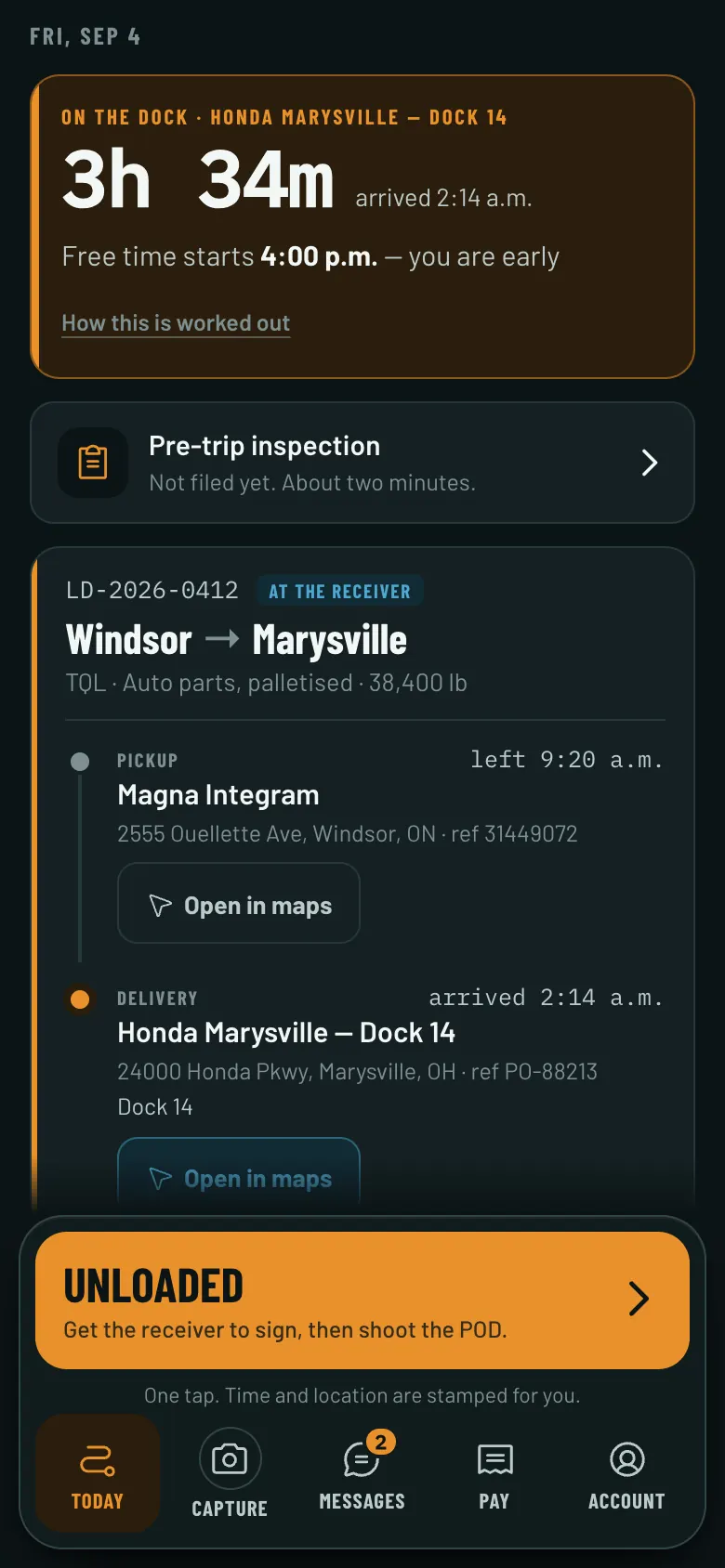
The next stop, the address that opens in maps, the dock clock, and one large button for the only thing that makes sense right now. Say it or type it — “delivered, dock 14, waiting on the lumper” — and the phone turns that into the status and the note by itself, with no model and no signal. Taps queue on the phone and go when the bars come back, and a tap that is replayed is never counted twice.

Paperwork from the seat
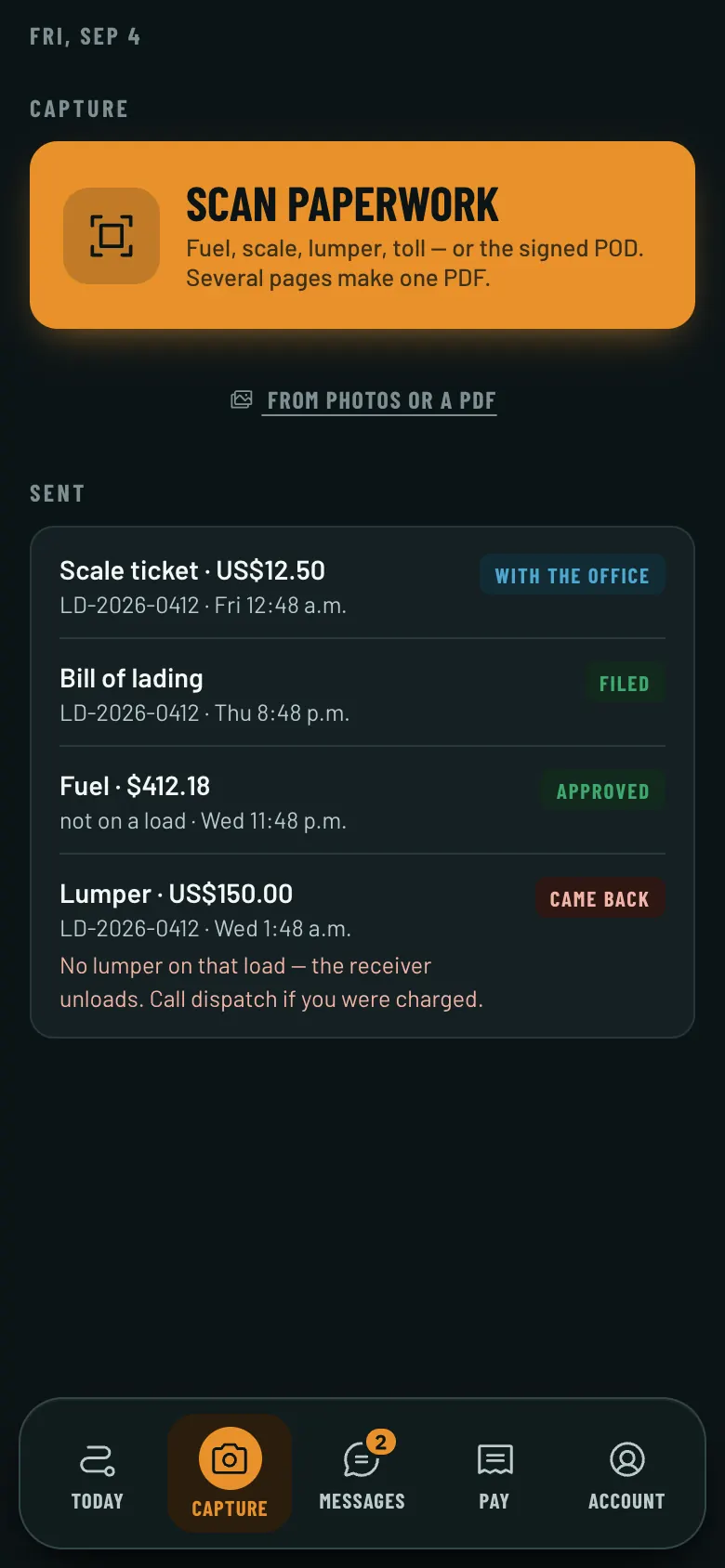
A real scanner: edges found, the page squared, several pages into one PDF. A fuel receipt becomes a claim the office reviews with the driver’s figures beside what the receipt says; the signed POD lands on the load and “Bill it” appears.
The dock clock
Free time and detention counted from the arrival the driver tapped, on the phone and on the board, so the wait is billed instead of written off.
The daily inspection
The walk-around is the regulation’s own list, filed from the phone in a dead zone, and only a vehicle out of service stops a truck.
Their own statement, never the rate
A driver reads their pay statement and their paystub in the app. The rate is not in it, not in their statement, and not in anything their account can reach — the database enforces that, not the screen.

On iOS and Android, and as a link that works on day one: a driver signs in with a code sent to their email and is working before anything is installed.

The Today screen of the driver app: a dock clock reading three hours and thirty-four minutes on the dock at Honda Marysville with free time starting at four, a pre-trip inspection row, the load card for Windsor to Marysville with both stops, and one large amber button reading Unloaded.
Today
Finding freight

Freight you can find on day one.

Brokers and shippers post loads on the Vasthaul market, and every carrier on the platform can see them. A card shows the lane, the dates, the equipment, the rate, the rate per loaded mile, the deadhead from your nearest free truck and — labelled as the estimate it is — what the run leaves after the cost of running it, from your own trucks’ figures. Offer at asking or counter; when the poster accepts, it is a load on your board with the tracking link already issued.

The Market screen: a search form for origin, destination, dates, equipment and rate per mile, and a load card for Windsor to Chicago showing the rate, the rate per loaded mile, the deadhead, the estimate of what the run leaves on unit 12, the driver’s hours, and Offer at asking and Counter buttons.
  • Who you are dealing with

    Every poster and every carrier carries a badge read from FMCSA’s own register — authority, insurance on file, out-of-service status — dated, with the source named. A poster can ask for verified carriers only, and a Canadian company with no US number is told that plainly rather than marked as failed.

  • Your own lanes, not an index

    The figure on a card is worked from your realised cost per mile on that truck, and the reports say what a lane paid you, by customer — never what a market average says it should have.

  • The boards you already pay for

    DAT, Truckstop, 123Loadboard and Direct Freight connect with your own subscription login once each board has approved the connection. That approval is theirs to give; it is asked for, and until it lands the product says so in plain words rather than drawing an empty board.

Money

The money you were going to write off.

Most of what a carrier loses is not stolen. It is short-paid, never billed, or waiting on a piece of paper nobody chased. Four screens, each built from rows you already have.

The Money at risk screen: a total at risk, a strip of the largest items, counts for short-paid, overdue, billed off the rate con, detention unclaimed and waiting on a POD, and a table of items by load or invoice with a Draft follow-up button on each.

Money at risk

Short pays, invoices that disagree with the rate con, detention that was never billed, missing PODs and invoices past their terms — found from your own rows, biggest first, with the follow-up email already written from the same figures, so every number in it is exactly right or not there.

FLOORFIRST SHORT DAYCLOSES THE GAP

Cash flow, thirteen weeks out

Open invoices land on each customer’s measured days-to-pay, settlements on their Friday, payroll on its pay date, the recurring costs the ledger shows, fuel as it has been running. The forecast names the first day the account goes under the floor, by how much, and what closes the gap — and prints every assumption it rests on, with its number.

The IFTA return screen for the third quarter of 2026: the quarter picker, the totals for IFTA miles, non-IFTA miles, gallons and miles per gallon, two notes about loads with no measured route, and a table of every jurisdiction the fleet ran in with taxable miles, taxable gallons, tax-paid gallons, the rate and the tax or credit.

IFTA, computed

Every load’s miles are cut at the state and province lines from the truck-legal route it was measured on, and fuel is already recorded by the jurisdiction it was bought in. The quarterly worksheet comes out at the rates IFTA published for that quarter, with the CSV and the PDF. It does not file the return and it does not pay the tax — you do, with your base jurisdiction.

A driver settlement waiting for approval: the net amount to write on the cheque, gross, reimbursements, deductions and advances, an Approve button that notes approving freezes it permanently, and the load pay lines each showing the load, the base and the percentage rule.

Settlements and paystubs

Pick the week: every driver’s statement is built from the pay rules, and every line names the rule it came from. Approval freezes it in the database — a mistake is a correction on the next statement, in writing. Employees get gross-to-net for Canada and the United States and a paystub for the landlord’s desk; nothing is deposited and nothing is remitted by us.

Vast, and the autopilot score

It prepares. You approve.

Vast is the part of Vasthaul that does the work — and the thing you talk to. Type at it or say it out loud, and it answers off your own rows: who is late, what you have not billed, which loads on the market would leave the most on a truck you have sitting. Ask it to do something and it shows you exactly what would happen — the driver, the load, the rules that would refuse it — and waits for you to press. Underneath, it reads the documents, drafts the loads, ranks the drivers, moves a status when the truck crosses the geofence and drafts the invoice when the POD lands, each at a level you set. Every act is written down with the reason and can be undone for ten minutes. It never spends money, never files anything with a government, and never writes to a customer without a person pressing the button. That is not a limitation we are working around; it is the design.

  1. Dispatch
    SuggestSend it

    Ranks who can take the load — free when and where, hours left, paperwork, endorsements, the trailer — and says why in a sentence. A hard rule fails out loud.

  2. Status
    Driver tapsGeofence

    Arrived and departed from the truck’s own position, or from the driver’s tap; either way the clock starts.

  3. Invoice
    Bill itDraft on POD

    The invoice drafted the moment the signed POD is on the load. A person still sends it.

  4. Settlement
    Build itDraft the week

    The week’s statements built and waiting. Only an owner can approve one.

The autopilot score
  • Ran on its own
  • Prepared, you pressed
  • By hand
  • Held, with why

Per operation over the week — dispatches, statuses, notices, invoices, settlements, claims, inbox replies — how many ran without a touch, how many the machine prepared and a person pressed, how many were done by hand, and everything it held back with the reason. Read off the log, never rounded.

Say it, or type it

Who is late today?

Ranwho_is_late · today · 11 loads read

Three of your eleven running loads are behind. Two will still make the window. The Mississauga → Columbus run will not: the receiver closes at 16:00 and the truck is 40 minutes out at 15:50. The customer has not been told.

LoadLaneBehindWhat it means
VH-4471Mississauga → Columbus1 h 10 lateWill miss the window
VH-4468Brampton → Detroit35 min lateRecoverable
VH-4455Cambridge → Buffalo20 min lateRecoverable
Also asked hereWhat have I delivered and not billed?Which customers haven’t paid in 30 days?Find me a truck out of TorontoWhat is due for a service?Will we be short this month?

The model is shown the sentence and nothing else. All it gives back is which of twenty-five questions you asked, a sentence of its own that may not contain a single digit, or the name of one thing to do and who to do it to — in your words, never an id. Not one row of your database is sent, no figure you read here was written by a model, and nothing it returns changes anything until you press it.

  1. 01

    A model reads. It never writes.

    Rate confirmations and receipts are read into a draft, and the box that was filled shows the text it was read from. A dispatcher or the office confirms it. When Vast offers to put a driver on a load, it names them in your words and this software finds the row — the model has no way to book, pay or send.

  2. 02

    It is never handed your numbers.

    When you ask a question, the model picks which of a fixed list of reports answers it and fills in the dates. It is never given one of your rows and it never states one of your figures — the answer is worked out afterwards, from your own database, by the same code these screens run.

  3. 03

    Money moves once, by the database.

    An approved settlement is frozen. Advances, deductions and reimbursements are run down in the same transaction that approves it, so nothing is paid twice and nothing is forgotten.

  4. 04

    Every send is on the record.

    An invoice email, a briefing, a failed delivery — logged with the address, the attachments and the provider’s message id. "Did we send it?" has an answer.

Both sides of the line

Canada is not a currency toggle.

Most fleet software assumes a CDL, a DOT medical card, miles and US dollars. A carrier in Windsor or Brampton needs AZ licences, CVOR and NSC numbers, CVIP inspections, kilometres, Canadian dollars, and GST or HST on domestic freight but not on the load going south. All of that is in the product from the first migration, not bolted on in year three.

CA + US

The load knows which way it is going

A cross-border load opens its own customs record with the direction read off the stops: PARS north, PAPS south, the ACE or ACI manifest, the broker, the papers that have to be in hand. A PARS label heading south is refused. One question — is this load ready to cross? — is answered the same way on the office screen, on the driver’s phone and in the morning briefing, with the wait at the crossing and the CBSA port codes, the Gordie Howe International Bridge included.

CAD · USD

Two currencies, one ledger

Money is integer cents with its currency beside it, never a float. A load is billed in the currency the rate con names, a Canadian driver is paid in Canadian dollars, and the tax engine knows that detention is freight and a lumper is not. The price on this site is in US dollars, with the Canadian equivalent shown at the Bank of Canada’s rate.

The Border screen for a load from Windsor to Marysville: Not ready, three things — the ACE manifest sent but not accepted, a PAPS number missing and the label not in hand — the crossing set to the Ambassador Bridge FAST lane with the port’s own notes, the ACE trip number, and the customs broker.
Licences
Provincial licences and CDLs; medical certificates and DOT medical cards; FAST cards and passports
Numbers
CVOR, NSC, DOT and MC on the carrier; SCAC on the manifest
Distance
Kilometres or miles, per carrier and per truck
Tax
GST, HST and QST by province; zero-rated on freight that crosses the border; none on US freight
Border
PARS and PAPS labels, ACE and ACI manifests, the broker on the load
Fuel
Purchases by jurisdiction, litres or gallons, ready for the IFTA fuel tax return
Trust and security

Walled off by the database, not by the screen.

Every fact below was read off the migrations and the tests that hold it, and the audit that checked them is written down. None of it is a badge anybody bought.

  • RLS · forced

    Every table is walled per carrier

    Row-level security is enabled and forced on every table. Another carrier’s rows are invisible to you by the database itself, not by the application remembering to filter.

  • Four doors

    Four anonymous entrances, counted

    Exactly four functions answer without a session — the intake address, the tracking link and two more, each documented and each behind its own credential — and the test suite counts them, so a fifth cannot land quietly.

  • ca-central-1

    Data held in Canada

    The database and every document in it are in Canada. The application is served from Cloudflare’s network, and every provider that touches your data is named on the sub-processor page with the one job it does.

  • No card data

    A card number never touches us

    Card numbers go to Stripe directly and are never seen by the product — and there is no card to enter for the trial.

  • Drivers

    Drivers never see revenue

    A driver’s account cannot reach the column the rate lives in. Enforced below the screen, and proven from both sides of two carriers by the test suite.

  • Ledger

    Money moves once, by trigger

    An approved settlement is frozen by the database. A payment is voided, never deleted; a balance is recomputed, never nudged.

  • Model

    A model reads; it never writes

    Documents are read into drafts a person confirms, and a question typed into Vast sends only the sentence. No row of your database goes to a model, and nothing a model returns can change one.

  • Export

    Yours to take out

    Everything you entered can be exported whole by the owner at any time, credentials excluded, and deleted on request.

How personal information is handled · Every provider that touches your data · The data processing addendum

Who it is for

A broker is not a carrier with no trucks.

Most software in this industry sells one product to everyone who touches freight and lets each of them find out for themselves which half does not apply. Vasthaul asks at the door, and answers honestly. All five have a working product surface today, and where one is thinner than the full job it is saying so in the same words the sign-up screen uses.

  • Carrier

    Built

    You own trucks and haul freight. Dispatch, the driver app, settlements, invoicing, compliance and the border — the whole product, at any fleet size.

  • Owner-operator

    Built

    Your truck, your authority, and usually you driving it. The same product, priced for one to four trucks, with your own settlement built from your own pay rules.

  • Dispatch service

    Built

    You dispatch for several small carriers. One login holds them all: a desk showing every carrier you dispatch for — what is late, what has nobody on it, what is sitting on a dock — and one press into any of them. What is deliberately not there is a merged board. Two carriers’ loads in one column is a mistake, not a feature, so every number and every row on the desk names the carrier it belongs to.

    What works today: each carrier opens its own account and invites you as a dispatcher. All carriers is the desk across them; opening one switches you into it. No carrier’s money is on the desk — not receivables, settlements or rates — even for a carrier you own yourself.

  • Freight broker

    Built

    You own no trucks. The working market workspace lets you post loads, receive carrier offers, accept one and follow the load. A full brokerage system still needs carrier files, outbound rate confirmations, payables and margin.

    What works today: post your loads on the Vasthaul market and read the offers, with the carrier’s FMCSA record on each. Say you are a broker at sign-up and that is the workspace you get.

  • Shipper

    Built

    You have freight to move. The working market workspace lets you post it, receive offers, accept a carrier and follow the load. A full shipper transport office still needs tenders, quotes, routing guides and awards.

    What works today: post the load on the Vasthaul market, read the offers with each carrier’s FMCSA record beside them, accept one, and follow the truck on the tracking link. If a carrier you use already runs on Vasthaul, ask them for a portal login too.

  • Something else

    Leasing companies, freight forwarders, private fleets, a carrier that also brokers out its overflow — tell us which of those you are and what a week looks like. We would rather turn you down with a reason than take a subscription off you and find out in month two.

Pricing

Flat per fleet. Never per seat.

Seven plans, priced by truck count in US dollars: $149 a month for 1 to 4 trucks, $399 for 5 to 10, $799 for 11 to 25, $1,100 for 26 to 75, $1,900 for 76 to 150, $3,400 for 151 to 300, and $5,900 for 301 and up. A busy month costs the same as a slow one — there is no fee per load, per shipment or per mile, so the one week you finally fill every truck is the week your software bill does not move. It is the same product at every band: an owner-operator on Solo runs the code a four-hundred-truck fleet runs, not a cut-down version of it. And there is a published price at every size, including 301 and up, which is exactly where the rest of this market stops publishing. Per-user pricing punishes a carrier for hiring a second dispatcher, so every plan includes unlimited office and driver accounts. Every plan starts with a 14-day free trial of the whole product, with no card to start: add one when you are ready and it is not charged until the trial ends. Onboarding is estimated for your fleet on every plan, never a published figure — it depends on how much you bring with you (trucks, drivers, customers, pay rules, and whatever you are running on today), it may be waived, and it is agreed with you before anything is charged.

Rate confirmation

Carrier
Your fleet
Issued by
Vasthaul
Covers
Every load you haul
Currency
USD, billed monthly
Flat per fleet14-day free trial, no card to start

Prices are in US dollars and billed in US dollars, in both countries.

PlanTrucksPer month
Solo1–4 trucks
$149
Starter5–10 trucks
$399
Professional11–25 trucks
$799
Complete26–75 trucks
$1,100
Fleet76–150 trucks
$1,900
Regional151–300 trucks
$3,400
Enterprise301+ trucks
$5,900
Terms
14-day free trial, no card to start

The whole product for fourteen days, with no card to start. Add one when you are ready — it is not charged until the trial ends — or do not, and everything you entered stays yours to read and export.

Onboarding: estimated for your fleet

It depends on how much you bring — trucks, drivers, customers, pay rules, the spreadsheet you run on today — and it may be waived. Agreed with you before anything is charged.

Every plan
  • Unlimited dispatchers, accountants and drivers
  • No fee per load, per shipment or per mile — a busy month costs the same as a slow one
  • The same product at every band, from one truck to five hundred
  • 14-day free trial of the whole product, no card to start
  • Onboarding estimated for your fleet — it depends on what you bring, and it may be waived
  • The driver app on iOS, Android and as a link
  • Loads by email, invoicing, settlements, border, briefing
  • Database and documents held in Canada; the application is served, documents are read and email is sent by providers outside it, each one named on our sub-processor page
  • Support from people who have read your pay rules
Above three hundred trucks

Enterprise is a published price, not a quote: 301 trucks and up, the same flat monthly, the same unlimited accounts. Six of the systems a fleet that size is also looking at publish no price at all, and the four that do stop well below this band. Past five hundred trucks we agree the figure with you before anything is signed, and onboarding is estimated on the terminals and the systems involved, as it is for every fleet.

One truck, or a broker

One truck? Yes — that is what Solo is, and it is the same product a fifty-truck fleet runs on rather than a cut-down version of it. What we do not do yet is freight brokerage: a broker needs carrier files, rate confirmations going out rather than coming in, and the margin on every load, and none of that is built. Say so on the sign-up screen and we will come to you first when it is.

Compared

Against the four you will also be quoted.

Read from each vendor’s own site and pricing page on 4 September 2026, and from named third-party listings where the vendor publishes nothing. A cell that says not published is a fact about their website, not their product: assume they have it, and ask them. Nothing here was scored in our favour by guessing.

What a carrier asksTruckbaseAlvysRose RocketAxonVasthaul
A price published on the websitePartial$290 a month floor; the rest unpricedNoYesfrom $2,080 a monthNoYesseven bands, $149 to $5,900
A published price at every fleet size, 301 trucks and up includedNoNoNoNoYes
Flat per fleet, unlimited usersPartialfive pricing models, one pricedNot publishedYesNot publishedYes
No fee per load or per shipmentNoa per-load model is offeredNot publishedYesNot publishedYes
A free trialNot publishedNoper SelectHubNot publishedNoper CapterraYes14 days, no card to start
A rate confirmation read into a draft loadYesPartialYesYesYes
Rate cons arrive by email and file themselvesNot publishedNot publishedYesNot publishedYes
Ask a question of your own data in wordsPartialPartialNot publishedNot publishedYesthe model never sees a row
Driver app in the App Store and Play Store todayYesYesYesNot publishedNoa link, and the builds; not listed yet
Daily inspection (DVIR) filed from the driver’s phonebuilt after the teardownNot publishedPartialNot publishedNot publishedYes
Money at risk: short pays, unbilled detention, missing PODs, with the follow-up draftedNot publishedNot publishedNot publishedNot publishedYes
An approved settlement frozen by the databaseNot publishedNot publishedNot publishedNot publishedYes
IFTA quarterly return calculatedbuilt after the teardownNot publishedYesNot publishedYesYesworksheet, CSV and PDF; never filed
A customs record per load, PARS and PAPS held to the directionNolisted as coming soonNot publishedNot publishedNot publishedYes
GST and HST by province, QST, zero-rated across the borderNot publishedNot publishedNot publishedNot publishedYes
Search and post to DAT and Truckstop from insideNot publishedYesYesNot publishedNopartner access asked for; not connected yet
Custom dashboards or a report builderPartialYesYesYesNothree fixed reports, each with a CSV
A morning briefing email in sentences, from your own numbersNot publishedNot publishedNot publishedNot publishedYes
Onboarding included in the priceYesYesYes90-day go-liveNot publishedPartialestimated for your fleet; may be waived

Sources: roserocket.com/pricing, alvys.com/pricing and alvys.com/features, truckbase.com/pricing and truckbase.com, axonsoftware.com/trucking-software, and the Capterra and SelectHub listings named beside the rows that rely on them. The Vasthaul column is the built product, not the roadmap. Truckbase, Alvys, Rose Rocket and Axon are the trademarks of their owners; Vasthaul is not affiliated with, endorsed by or sponsored by any of them, and names them only to say what each one publishes. Vendors change their products and their pricing and we do not track those changes as they happen, so a cell can go out of date between readings. If one is wrong, write to hello@vasthaul.com and we will correct it.

Questions

Asked before signing.

What is Vasthaul?

Vasthaul is a transportation management system — a TMS — for trucking carriers in the United States and Canada, at any fleet size: twenty trucks or five hundred. One record carries a load from the rate confirmation through dispatch, the driver's phone, the invoice to the customer and the driver's settlement, so the same figures are used all the way through.

Is this a TMS or trucking dispatch software?

Both words describe it. Carriers shop for trucking dispatch software and end up needing invoicing and driver pay a month later, which is when a dispatch tool becomes three tools. Vasthaul is one: dispatching, invoicing, settlements, compliance and fuel records on the same load.

What does it cost?

Seven published plans, priced per fleet in US dollars: Solo, $149 a month for 1–4 trucks; Starter, $399 a month for 5–10 trucks; Professional, $799 a month for 11–25 trucks; Complete, $1,100 a month for 26–75 trucks; Fleet, $1,900 a month for 76–150 trucks; Regional, $3,400 a month for 151–300 trucks; Enterprise, $5,900 a month for 301+ trucks. Every plan starts with a 14-day free trial, no card to start. Onboarding is estimated for your fleet on every plan and never a published figure: it depends on how much you bring — trucks, drivers, customers, pay rules, the spreadsheet you run on today — and it may be waived. There is no per-user fee and no fee per load, so a busy month costs the same as a slow one. The top plan has no truck ceiling, so a fleet that grows moves up a band rather than off the price list.

Is there a free trial?

Yes — fourteen days of the whole product on every plan, with no card to start. Add a card when you are ready and it is not charged until the trial ends; cancel before then and it is never charged. If you let the trial run out without one, new loads wait until a card is on file, and everything you entered stays yours to read and export. You get a note in the product at seven, three and one day(s) out, and one email at three.

What makes it different from the other TMS we are looking at?

Four things. One load record instead of modules that have to be kept in step. A flat price per fleet rather than per seat. Canada in the product from the first migration — CVOR, NSC, CVIP, kilometres, GST and HST — not a currency toggle. And software that drafts and flags but never books, sends, pays or files: Vasthaul prepares, a person approves.

We are a freight broker — can we use it?

Not as your TMS, and we would rather say that than take your money. A broker is not a carrier with no trucks: you need a file on every carrier you use with their authority and insurance on it, rate confirmations that go out rather than come in, what you owe each carrier and when, and the margin on every load. None of that is built. What is built is the Vasthaul market: say you are a broker on the sign-up screen and you get a posting workspace — post a load, read the offers with each carrier's FMCSA record beside them, accept one, and follow it on the tracking link. No commission is taken today, and we will come to you first when the rest is built.

Can an owner-operator use it?

Yes, and there is a price for it: $149 a month for one to four trucks, after the same 14-day free trial every plan gets. It is the same product a fifty-truck fleet runs on, not a cut-down version — your own settlement built from your own pay rules, the driver app on your own phone, invoices with the POD attached, and the border on the load. Setting it up is usually a spreadsheet you upload rather than a week of somebody entering things, which is why onboarding for one truck is estimated rather than listed, and is often waived.

We are a dispatch service — how does that work?

Each carrier you dispatch for opens their own account and invites you as a dispatcher, and one login holds all of them. All carriers is the desk across the lot: what is late, what has nobody on it, what is sitting on a dock, at every carrier at once, with the carrier on every row — and one press takes you into whichever needs you, with the whole product for that carrier. What you will not get is a merged board. Two carriers’ loads in one column is a mistake we fixed rather than a feature we are missing, so the desk adds nothing up across carriers and carries none of their money.

Does it do IFTA?

It calculates the quarterly return. Every load’s miles are split at the state and province lines from the truck route it was measured on, your fuel-card purchases are already recorded by the jurisdiction they were bought in, and the worksheet comes out with the miles, the fuel, the fleet average, the tax or the credit for each jurisdiction and the total — at the rates IFTA published for that quarter, which refuse to compute if the quarter is not loaded rather than quietly using the last one. Print it, export it, hand it to your bookkeeper. It does not file the return and it does not pay the tax: you file with your base jurisdiction, and a load with no measured route is listed by number so you can fix it rather than being estimated.

US or Canadian dollars?

US dollars, in both countries, so the price on this page is the price on the statement. A Canadian carrier sees the equivalent beside it at the Bank of Canada rate; the card issuer's rate on the day is the one that applies.

Is it really not priced per user?

No, and it is not priced per load either. The price is per fleet, by truck count. Add a dispatcher, an accountant, or ten drivers and the bill does not change; haul twice as many loads next month and the bill does not change. Add trucks and eventually you move up a band, which is the only thing that changes it. Several systems in this market bill by included shipments with overages above them, which charges a carrier more in a good month.

Do my drivers have to install something from an app store?

Not on day one. The driver app is also a web app: a driver opens a link, signs in with a code sent to their email, and is working. The iOS and Android builds are the same app with the camera and location plumbed in, and they are not in the app stores yet — the link is the way in today.

What happens to the spreadsheet we run on now?

It is imported during onboarding — trucks, drivers, customers, pay rules, open loads. You do not start empty, and you do not type it all in yourself.

Can drivers see what a load pays?

Never. A driver sees the stops, the times, the references, the instructions and their own pay. The rate is not in their app, not in their statement, and not in the data their account can reach.

What does the software do on its own?

It reads documents into drafts, builds statements, watches the clocks, sends the briefing and answers questions about your own records. It does not book a load, send an invoice, approve a settlement or file with customs. Those are buttons, and a person presses them.

Does our data go to an AI company?

The documents you hand the reader do: a rate confirmation, a receipt or a delivery document goes whole to the model and comes back as a draft somebody checks. A question you type goes as the sentence you typed and nothing else — no load, no rate, no customer and no row of your database is ever sent to a model, because the model’s only job is to pick which report answers you. The answer is then read out of your own database by the same code these screens run. Every provider is named on our sub-processor page.

Where is our data?

The database and the files in it are in Canada, and each carrier’s rows are walled off from every other carrier’s by the database itself, not by the application. The software that serves it runs on a network outside Canada, and document reading, email, billing, sign-in and second-factor codes are done by providers outside it. Every one of them is named on our sub-processor page, with the one job it does. Your own data is yours to take out.

How long does onboarding take?

Onboarding is built to have you dispatching in the first week and running a settlement at the end of it. What it costs is estimated for your fleet rather than listed, on every plan, because it pays for our hours that week and those depend on what you bring — a fleet of thirty with clean records is not the same week as a fleet of two hundred with none, and four trucks off a spreadsheet is often no week at all, in which case it is waived. Whatever the figure, it is agreed with you before anything is charged.
The longer answers have their own pages: how we handle personal information, every provider that touches a carrier’s data, the data processing addendum, the agreement a carrier signs, where the software falls short on accessibility, how an account is closed and deleted.

Start here

Fourteen days of the whole product. No card to start.

Import the spreadsheet you run on, forward one rate con to your intake address, and watch Friday’s statement get built from your own pay rules — every line traced to its rule. Or bring last week’s loads and one driver’s pay sheet to a walkthrough and we will build it in front of you.

hello@vasthaul.com
Settlement · Aug 24 – Aug 30
D. Okafor
Waiting for approval
  1. LD-2026-0038 · Windsor ON → Columbus OH
    1,240 mi × $0.62 · per-mile rule from Mar 1
    $768.80
  2. LD-2026-0041 · Brampton ON → Detroit MI
    233 mi × $0.62 · per-mile rule from Mar 1
    $144.46
  3. Stop pay · LD-2026-0041
    2 extra stops × $35.00
    $70.00
  4. Detention · LD-2026-0041 · Detroit
    3 h 10 min on the dock, 2 h free, $25.00/h
    $29.17
  5. Fuel — Flying J Windsor, Aug 27
    receipt on file · driver paid
    $184.20
  6. Correction to Aug 17–Aug 23
    short-paid the second stop on LD-2026-0031
    $35.00
  7. Occupational insurance
    weekly deduction
    −$48.00
  8. Fuel advance, Aug 20
    repayment 2 of 4 · $250.00 remaining after this
    −$125.00
HeldLD-2026-0043 delivered Friday, no POD yet — pays next week when it lands.
Net pay · CAD
$1,058.63
Approve